Content Plan Examples – 3 Easy Templates to Start Today
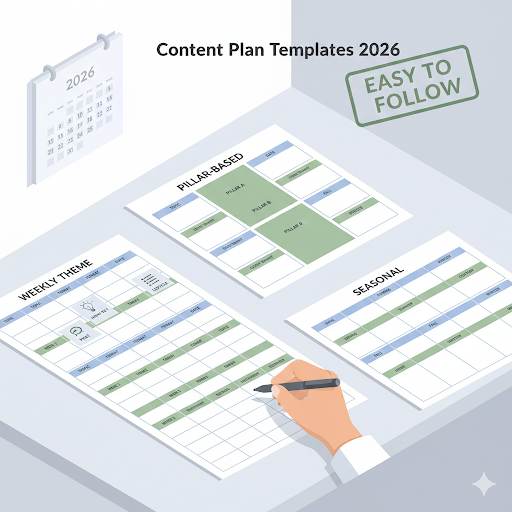
📘 TL;DR – What you’ll learn: Trying to create content without a plan is like driving with no map. This guide gives you 3 easy content plan templates you can copy and use today – a 1‑month beginner blog plan, a social + blog weekly plan, and a monthly focus plan. You’ll also learn why a content plan matters, common mistakes to avoid, and how to create your own plan step by step.
🔥 The “What Do I Post?” Problem
Let me ask you something, friend. Feeling stuck on what to post next? You’re not alone. If you’re just starting out and want to grow your blog or online brand, figuring out what to write, when to post, and how to stay consistent can feel overwhelming. Trying to create content without a plan is like driving with no map. You might move forward, but you’ll waste time, energy, and probably get lost.
That’s why you need a content plan — a simple, clear roadmap to help you know exactly what to post and why. In this beginner‑friendly guide, I’ll show you real content plan examples you can actually use. No fluff, no confusing jargon — just simple steps to help you stay on track and grow with confidence. Let’s make content planning easy.
Before we dive into the templates, understand the foundation of good content planning. My Blog Content Strategy guide covers the 7‑step framework to plan, create, and grow like a pro. And to never run out of ideas, read Content Ideation Secrets – it gives you a system to generate endless topics.
📌 Quick truth: Without a plan, you’ll end up posting random stuff that doesn’t connect, feeling overwhelmed with ideas (or stuck with none), and losing motivation. But with a content plan, you stay focused, create content your audience actually wants, and grow faster with less stress.
✅ What is a Content Plan?
A content plan is simply a roadmap for what content you’ll create, when you’ll post it, and where it’ll go (like your blog, social media, email, etc.). It helps you stay organized, save time, and show up consistently for your audience. Think of it like your personal assistant, telling you what to do each day to grow your blog.
📊 Why You Need a Content Plan
Without a plan, you’ll end up:
- Posting random stuff that doesn’t connect.
- Feeling overwhelmed with ideas (or stuck with none).
- Losing motivation because results feel slow or unclear.
But with a content plan:
- You stay focused.
- You create content your audience actually wants.
- You grow faster, with less stress.
📋 Simple Content Plan Examples (You Can Copy)
Example 1: 1‑Month Beginner Blog Plan
- Week 1: Write a “How to Get Started” post in your niche.
- Week 2: Answer a common beginner question.
- Week 3: Share a simple checklist or tips list.
- Week 4: Write a story about your personal experience.
Example 2: Social + Blog Weekly Plan
- Monday: New blog post (SEO‑friendly).
- Tuesday: Create 2‑3 social posts from the blog content.
- Wednesday: Share a tip or quick insight.
- Thursday: Promote an older post.
- Friday: Ask a question or post something fun to engage.
Example 3: Monthly Focus Plan
Each month, pick 1 topic to focus on (like “SEO for Beginners”) and create:
- 2‑4 blog posts around that topic.
- A free checklist or guide to grow your email list.
- Social posts that support each blog topic.
- An email to send to your subscribers.
This method helps you stay on‑brand and build topical authority.
🛠️ Tools That Make Planning Easier
You don’t need fancy tools. Start simple:
- Google Calendar – schedule posts like appointments.
- Notion or Trello – to organize ideas and track your workflow.
- Google Sheets – to build a quick and easy content calendar.
Use Canva to create visuals for your content, and Grammarly to polish your writing before publishing.
❌ Common Mistakes Beginners Make
Avoid these and you’ll be ahead of 90% of people:
- Overplanning: Don’t try to plan 6 months in advance. Start with 2–4 weeks.
- Being too random: Stick to one niche/topic at a time.
- Ignoring SEO: Plan around what people are searching for.
- Never promoting your content: You wrote it — now get people to see it. For a complete guide, read 8 Free Traffic Strategies – it covers Pinterest, Quora, Facebook groups, and more.
💡 The Brutal Truth (Read This Twice)
Most beginners never create a content plan because they think it’s too much work. They write random posts whenever they feel inspired, then wonder why their traffic is flat. Meanwhile, bloggers with a simple plan publish consistently, build an audience, and grow faster.
Content plan examples are not complicated. Pick one of the templates above. Fill in your topics. Schedule your posts. Then execute. A plan doesn’t have to be perfect – it just has to exist. The bloggers who succeed are not the ones who have the best ideas. They are the ones who have a plan and stick to it.
⚠️ Remember: Just because you have a content plan doesn’t mean you’re stuck with it forever. Think of it more like a guide – something to keep you on track when your energy or focus dips. Start small. Be consistent. Forget perfect.
📝 How to Create Your Own Content Plan (Step‑by‑Step)
- Define your niche: Who are you helping, and with what?
- Choose your content goals: Do you want more traffic? More email signups? Focus.
- Pick 3–4 main content topics: These are the big ideas you’ll rotate around.
- Decide how often you’ll post: Once a week is great to start.
- Create a simple calendar: Don’t overthink it — just write it down.
- Write with intent: Each post should solve a problem or answer a question.
- Promote it: Share it on Pinterest, Facebook, or wherever your audience hangs out.
- Track what works: Look at traffic and engagement. Do more of what works.
📅 Your 7‑Day Content Planning Action Plan
- Day 1: Define your niche and content goals.
- Day 2: Pick 3 main topics for your first month.
- Day 3: Choose one of the 3 templates above and fill in your first week.
- Day 4: Write your first post (don’t overthink it).
- Day 5: Create 2 social media posts from that blog content.
- Day 6: Schedule your posts for the next week.
- Day 7: Publish and promote. Then repeat.
After 7 days, you’ll have a working content plan and your first post live. That’s more than most beginners ever do.
🙋 Frequently Asked Questions
How far ahead should I plan my content?
Start with 2‑4 weeks. As you get comfortable, extend to 90 days. Don’t plan too far ahead – your audience’s needs might change.
What if I don’t stick to my plan?
It’s okay. A plan is a guide, not a prison. Adjust as you go. The important thing is to have direction.
Can I use these templates for YouTube or social media?
Yes. Adapt the same structure – topic, format, schedule – to any platform.
How do I know what topics to plan?
Use Google autocomplete, AnswerThePublic, or check what your competitors are writing about. Plan around questions people are actually asking.
Do I need to plan every single post?
No. Plan your blog posts and major content. Leave room for spontaneous ideas and timely topics.
🎤 Final Thoughts: Start Planning Today
Just because you have a content plan example doesn’t mean you’re stuck with it forever. Think of it more like a guide — something to keep you on track when your energy or focus dips. It helps you stay clear on what matters most and reminds you what to work on, even on tough days.
Start small. Be consistent. Forget perfect. Once you follow a plan that fits you, creating content feels less stressful — and a whole lot more fun.
Now it’s your turn: Take 30 minutes today, outline your next 4 posts, and commit to publishing one each week.
Let’s grow your blog — one simple plan at a time. You’ve got this, friend. 👊
👉 Ready to start your content plan today? Build your content calendar in minutes. Copy one of the 3 templates above. Start planning.