How to Get AdSense Approval in 2026 (10 Easy Steps
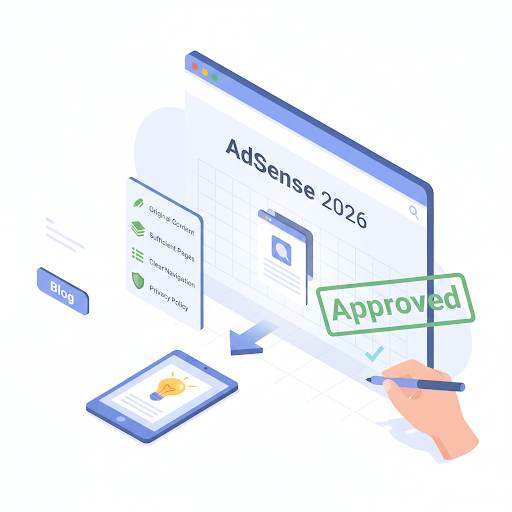
📘 TL;DR – What you’ll learn: Google AdSense is a free program that lets you earn money by showing ads on your blog. But you need to get approved first. This guide walks you through 10 simple steps – from picking a niche and writing 15‑20 quality posts, to adding essential pages and applying. Most beginners get rejected the first time – that’s normal. Fix the issues and reapply. You’ve got this.
🔥 The AdSense Question
Let me ask you something, friend. So you’ve started a blog… or maybe you’re thinking about it. You’ve seen other bloggers making money just by showing ads, and now you’re wondering: “How do I get AdSense approval too?” Great question. And don’t worry — even if you’ve never done this before, I’ve got you covered. In this guide, I’ll walk you through everything step by step — no tech talk, no fluff, and no confusing advice. Just real, simple tips to help you get approved by Google and start earning from your blog. Let’s dive in.
Before we start, understand the foundation of a blog that Google approves. My How to Start a Blog on Blogger guide walks you through the setup. And to ensure your blog is visible to Google, set up Google Search Console for Blogger – it’s free and shows you how Google sees your site.
📌 Quick truth: Google AdSense is a free program that lets you show ads on your blog. When someone visits your site and sees or clicks on those ads, you make money. It’s one of the easiest ways to start earning from your blog. But first, you need to get approved.
✅ What Is Google AdSense?
Google AdSense is a free program that lets you show ads on your blog. When someone visits your site and sees or clicks on those ads, you make money. It’s one of the easiest ways to start earning from your blog. But first, you need to get approved.
📊 Why Does Google Need to Approve My Blog?
Because they want to make sure your blog is:
- Safe and trustworthy
- Useful to readers
- Not full of spam or copied content
Once Google sees that your site looks good and follows their rules, they’ll approve you. And from there, it gets exciting.
📋 How to Get AdSense Approval (Step by Step)
1. Pick a Topic for Your Blog (Don’t Write About Everything)
Before anything else, choose one clear topic for your blog — like travel, recipes, tech tips, or fitness. Writing about random stuff makes your site look messy. Google (and readers) love blogs that focus on one thing.
2. Get a Real Domain Name
Free domains like myblog.blogspot.com are okay to start… but if you want to look serious, get a real domain like www.myblog.com. It only costs a few dollars a year, and it makes your blog look way more professional.
3. Use a Clean, Mobile‑Friendly Design
Don’t worry about fancy designs. Just pick a simple layout that works on phones, loads fast, and is easy to read. Make sure it’s not full of ads or pop‑ups. Clean and simple wins.
4. Write 15–20 Helpful Blog Posts
Here’s where most people mess up. To get approved, your blog needs real, helpful content. Not AI spam. Not copy‑paste. Write like you’re helping someone.
Each post should:
- Be original (no copying!)
- Be at least 800–1000 words
- Answer real questions people are searching for
- Have good formatting (headings, paragraphs)
Write at least 15 to 20 solid posts before you apply. Use Canva to create visuals that support your content, and Grammarly to polish your writing before publishing.
5. Add These Pages (Very Important!)
Google wants to see these pages on your site:
- About Me – Say who you are and what your blog is about
- Contact – Add a form or email so people can reach you
- Privacy Policy – You can use a free generator
- Disclaimer – Say you’re not giving legal, health, or financial advice (if relevant)
If you miss these, you might get rejected.
6. Stay Away from Risky Topics
Don’t blog about violence or hate, adult content, hacking, fake news, or illegal stuff. Stick to helpful, safe content. Google checks this carefully.
7. Make Sure Google Can Find Your Blog
Use Google Search Console to submit your blog. That helps Google know your site exists. It’s free and takes just a few clicks. For a complete guide, read the Search Console guide linked above – it walks you through setup and verification.
8. Get a Little Bit of Traffic First
While not required, it helps if your blog has some visitors. Share your posts with friends, on social media, or online groups. This shows Google that your blog is alive and useful. For a complete guide to getting traffic, read 8 Free Traffic Strategies – it covers Pinterest, Quora, Facebook groups, and more.
9. Apply for AdSense (Once You’re Ready)
Now that your blog looks good, has enough content, and the important pages, it’s time to apply.
Here’s how:
- Go to adsense.google.com
- Sign in with your Gmail
- Enter your website
- Follow the steps to connect your blog
- Submit the application
Then… wait. It usually takes a few days, sometimes longer.
10. What If You Get Rejected?
It happens. Don’t panic. Google will tell you the reason. Fix what’s missing — usually content or design issues. Then wait a few weeks and apply again. Many bloggers get approved on the second try. It’s normal.
🛑 Common Mistakes That Get People Rejected
Let’s save you from them:
- Applying with only 2 or 3 posts
- Copying content from other sites
- No “About” or “Privacy” pages
- Bad design or broken links
- Writing about restricted topics
- Using too much AI without editing
- Reapplying without fixing the issue
Avoid these, and your chances go way up.
💡 The Brutal Truth (Read This Twice)
Most beginners apply for AdSense too early. They write 5 posts, throw together a site, and wonder why they get rejected. Then they blame Google. But the real reason is simple: their blog isn’t ready.
How to get AdSense approval is not a secret. It’s about doing the work: 15‑20 quality posts, essential pages, a clean design, and some traffic. That’s it. If you skip any of these steps, you’re gambling. If you do them all, your chances are high. The bloggers who get approved are not the luckiest. They are the ones who prepared.
⚠️ Remember: Rejection is normal. Most bloggers get rejected the first time. Fix what’s missing, wait a few weeks, and reapply. Don’t give up after one “no.”
📅 Your 30‑Day AdSense Approval Action Plan
- Week 1: Pick your niche and domain. Set up your blog with a clean theme.
- Week 2: Write and publish 5 helpful posts (800+ words each).
- Week 3: Write 5 more posts. Add About, Contact, and Privacy Policy pages.
- Week 4: Write 5 more posts (total 15‑20). Promote your posts on social media.
- Apply: Submit your AdSense application. Wait 1‑2 weeks. If rejected, fix issues and reapply.
After 30 days, you’ll have a blog ready for AdSense approval.
🙋 Frequently Asked Questions
How many posts do I need for AdSense approval?
Aim for 15‑20 quality posts (800+ words each). Quality matters more than quantity. Google wants to see that your blog is a real, helpful resource.
Can I get AdSense approval with a free .blogspot domain?
Yes, but it’s harder. A custom domain (like yourblog.com) looks more professional and increases your chances.
How long does AdSense approval take?
Usually 1‑2 weeks. Sometimes longer. Be patient. Don’t reapply immediately if rejected – fix the issues first.
What if I get rejected?
Read the rejection reason carefully. Fix the issue (usually content or design). Wait 2‑4 weeks. Reapply.
Does AdSense approve blogs with AI content?
Yes, but the content must be high‑quality, original, and helpful. AI‑generated spam gets rejected. Edit and personalize every post.
🎤 Final Thoughts: Your Blog Is Ready – Now Apply
Getting AdSense approval isn’t about being a tech genius or having a huge audience. It’s about doing things right from the start. Take your time. Focus on quality. Be helpful. And show Google that your blog is real and ready.
You don’t need to be perfect. You just need to care.
Now go take that first step — write one helpful post. Then another. Then build the kind of blog you’d be proud to show anyone. Google will notice. And when you get that approval email, it’ll be worth it.
You’ve got this, friend. 💪
👉 Ready to start your AdSense journey today? Start your free blog. Follow the 10 steps above. Build quality content. Get approved. Start earning.