Add a Sign Up Form to Blogger: Collect Emails the Easy Way 2026
This post contains affiliate links.
📘 TL;DR – What you’ll learn: You don’t need a large audience to start collecting emails. A sign-up form lets you build an audience that keeps coming back – even if you’re just starting out. This guide shows you exactly how to add a sign-up form to Blogger using free tools like Systeme.io, with no coding skills required. Start building your email list today, even if you have zero subscribers.
🔥 The “I’ll Do It Later” Mistake
Let me ask you something, friend. Wanna grow your blog and keep visitors coming back? You need a sign up form—yes, even if you’re just starting out. In this post, I’ll show you exactly how to add a sign up form to Blogger step-by-step, with no tech headaches. Even if you don’t know anything about email marketing or code, you’re in the right place. Let’s keep it simple.
Before we dive in, understand why email marketing is the foundation of audience growth. My Why Email Marketing Is Important guide explains the 7 reasons you own your audience. And to write emails people actually open, read Email Marketing Best Practices – it gives you 10 proven tips for opens, clicks, and sales.
📌 Quick truth: People visit your blog once… and forget. A sign up form helps you build an audience, keep readers coming back, and grow your brand (and maybe income later). Even if you’re not ready to send emails now, start collecting them. You’ll be glad you did.
✅ What’s a Sign Up Form?
A sign up form is that little box you see on websites that says something like: “Enter your email to get updates!” When someone types their email in, they’re added to your list—so you can stay in touch, send tips, new posts, or even offers later. This is how real blogs grow. One subscriber at a time.
📊 Why Do You Need One?
Because people visit your blog once… and forget.
A sign up form helps you:
- Build an audience
- Keep readers coming back
- Grow your brand (and maybe income later)
Even if you’re not ready to send emails now, start collecting them. You’ll be glad you did.
🛠️ Tools You Can Use (Free & Easy)
You don’t need anything fancy. These are perfect for beginners:
| Tool | Best For | Free Plan |
|---|---|---|
| Systeme.io | All‑in‑one email + funnels | Free plan available |
| ConvertKit | Simple forms for creators | Free up to 300 subscribers |
| Google Forms | Basic, free, works well for starters | 100% free |
💡 Tip: Start with Systeme.io if you want a free tool that just works.
📋 How to Add a Sign Up Form to Blogger
Step 1: Create Your Form
Use one of the tools above to make a simple form. Just ask for the email. Keep it clean. Use Canva to design a simple header image for your form if you want to make it more visually appealing.
Step 2: Copy the Embed Code
Once your form is ready, the tool gives you a code. Copy it.
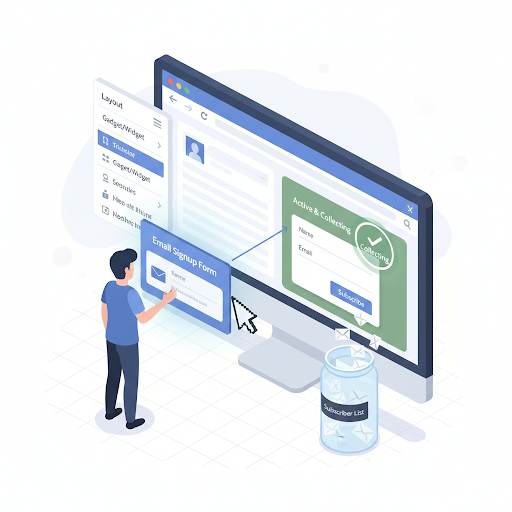
Step 3: Add It to Blogger
- Go to your Blogger dashboard
- Click on Layout
- Pick a spot (sidebar or footer works well)
- Click Add a Gadget → HTML/JavaScript
- Paste the code and save
Done. You just added your first email sign up form.
For more ways to customize your Blogger layout, read How to Customize Blogger Template – it covers safe editing practices and widget placement.
📍 Best Places to Show Your Form
Put it where people will see it:
- At the top or middle of your sidebar
- Under each blog post
- On your homepage
Don’t hide it. You want people to notice and take action.
✏️ What Should It Say?
Be clear and human. Don’t overthink it.
Try lines like:
- “Join my free email list”
- “Get blog tips straight to your inbox”
- “Subscribe for updates and freebies”
Tell people why it’s worth giving you their email. Keep it short.
❌ Common Beginner Mistakes
Here’s what to avoid:
- Asking for too much info (just ask for email!)
- Making the form hard to find
- Using boring or confusing words
- Not testing if the form actually works
One simple form is all you need to start.
📬 What Happens After Someone Signs Up?
Their email goes to your list.
You can:
- Send them a welcome email
- Share blog updates
- Offer free tips, tools, or downloads
Even if you send emails once a month—it’s still powerful. For a complete guide to writing emails that get opened, read Email Marketing Best Practices – it gives you 10 proven tips for opens, clicks, and sales.
💡 The Brutal Truth (Read This Twice)
Most beginners never add a sign-up form because they think they need “enough” traffic first. They wait until their blog is “big enough.” Meanwhile, someone else starts collecting emails from day one – even if it’s just 5 subscribers – and builds an audience that grows with them.
Adding a sign up form to Blogger is not complicated. It takes 10 minutes. You don’t need a big audience. You just need to start. Every subscriber is a reader who wants to hear from you again. That is the foundation of a sustainable blog.
⚠️ Remember: Don’t wait until your blog is “big” to care about email. Start with a simple sign up form today. It’s one of the best things you can do to grow—slowly, steadily, and smartly.
📅 Your 7‑Day Sign Up Form Action Plan
- Day 1: Sign up for Systeme.io (free).
- Day 2: Create a simple form (just ask for email).
- Day 3: Copy the embed code.
- Day 4: Add the form to your Blogger sidebar (Layout → Add Gadget → HTML/JavaScript).
- Day 5: Write a short, clear headline for your form.
- Day 6: Test the form by signing up with your own email.
- Day 7: Write a welcome email (keep it friendly and short).
In one week, you’ll have an active email list — even if it starts small.
🙋 Frequently Asked Questions
Do I really need a sign up form if my blog is new?
Yes. It’s never too early. Every subscriber is a reader who wants to hear from you again.
Can I use Google Forms for my sign up form?
Yes. Create a Google Form, get the embed code, and paste it into an HTML gadget in Blogger.
How do I know if my form works?
Test it yourself. Sign up with your own email. Check if you receive a confirmation or if the email appears in your tool’s dashboard.
What if I never send emails?
Start simple. Send one email per month — a roundup of your latest posts or a helpful tip. Consistency beats perfection.
🎤 Final Thoughts: Start Today, Grow Tomorrow
Don’t wait until your blog is “big” to care about email. Start with a simple sign up form to Blogger today. It’s one of the best things you can do to grow—slowly, steadily, and smartly.
Your future self will thank you. You’ve got this, friend. 🚀
👉 Ready to start collecting emails today? Sign up for Systeme.io (free). Create your form in 2 minutes. Embed it in Blogger. Start building your email list — for free.