On-Page SEO vs Technical SEO: Easy Guide (2026)
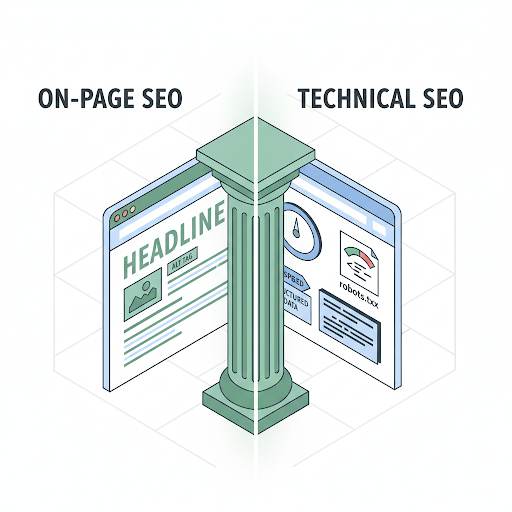
📘 TL;DR – What you’ll learn: On-Page SEO is what you do on your website (content, keywords, headings). Technical SEO is what happens behind the scenes (speed, mobile, security). You need both to rank. But start with On-Page SEO first – you control it. This guide explains the difference, why both matter, and gives you a 30‑day action plan to fix both.
🔥 The SEO Confusion
Let me ask you something, friend. You’ve seen the terms “On-Page SEO” and “Technical SEO” everywhere. And you’re probably thinking: “Wait… aren’t they the same thing? Do I need to worry about both?” You’re not alone. Most beginners feel the same way. But don’t stress — this post will break it all down for you in a simple, human way. By the time you finish reading, you’ll know exactly what each one means, why they matter, what to do first, and how to avoid beginner mistakes. Let’s get into it.
Before we dive into the comparison, understand the foundation of good SEO. My AI Keyword Research Tools for Beginners guide covers 7 free tools to find the right keywords. And to track your progress, set up Google Search Console for Blogger – it’s free and shows you exactly how Google sees your site.
📌 Quick truth: On-Page SEO is what you do ON your website (content, keywords, headings). Technical SEO is what happens BEHIND the scenes (speed, mobile, security). You need both to rank. But start with On-Page SEO first — you control it.
✅ So… What Is On‑Page SEO?
Think of On‑Page SEO as everything you do on your blog or website page to help Google understand your content. It’s how you tell Google, “Hey, this is what my page is about — show it to people looking for this!”
On‑Page SEO includes things like:
- Writing helpful blog posts using the right keywords
- Creating titles and URLs that make sense
- Using headers (like H1, H2) to organize your content
- Adding keywords naturally (not stuffing!)
- Writing a clear meta description
- Adding images with proper alt text
- Linking to other pages on your site
Simple, right? It’s all about making your content easy to read — for people and for search engines. For a complete guide to image optimization, read SEO for Images – it covers alt text, file names, and compression.
🛠️ What Is Technical SEO?
Now, Technical SEO is what happens behind the scenes. It’s the stuff that helps your website run smoothly, load fast, and be easy for Google to crawl (which means “read” or explore your site).
Think of it like this: On‑Page SEO is your content. Technical SEO is your website’s engine.
Technical SEO includes:
- Making sure your site loads fast
- Mobile‑friendliness (your site works well on phones)
- Securing your site with HTTPS
- Submitting your sitemap to Google
- Fixing broken links or pages that don’t load
- Making sure Google can find your pages
It may sound technical (because, well, it is), but don’t worry — you don’t need to be a developer to understand the basics. For a complete guide to fixing speed issues, read How to Increase Website Speed in Blogger – it covers 15‑minute fixes for common problems.
🎯 Which One Should You Focus on First?
Start with On‑Page SEO. Why? Because you control it. You can take action right now without needing any tools, code, or outside help.
Here’s a quick plan to start:
- Pick a topic your audience cares about
- Use one main keyword
- Write helpful, clear content
- Add your keyword in the title, first paragraph, and a few times naturally
- Use headers to break up the content
- Add one or two images with alt text
- Link to another related post on your site
Boom — you’ve already done solid On‑Page SEO.
⚖️ Why You Need Both (Not Just One)
A big mistake beginners make is thinking one type of SEO is enough. You can have amazing content, but if your website loads like a snail, no one’s going to wait for it. And you can have a fast, clean website — but if the content is weak, there’s nothing for Google to rank.
On‑Page SEO + Technical SEO = Real SEO success. They work together. And once you understand both, you’ll have a much better chance of showing up in Google and getting traffic.
❌ Common Beginner Mistakes to Avoid
Let’s save you some time (and headaches). These are the most common mistakes people make early on:
On‑Page SEO Mistakes:
- Using the keyword too many times (keyword stuffing)
- Not adding internal links
- Skipping the meta description
- Using the same title on multiple pages
- Writing for Google instead of real people
Technical SEO Mistakes:
- Not using HTTPS (your site isn’t secure)
- Slow site speed due to large images or too many features. Use Canva to create optimized graphics that load quickly.
- Broken links or error pages
- Not submitting your sitemap to Google Search Console
- Accidentally blocking pages from search engines
The good news? Most of these are easy to fix once you know what to look for. Use Grammarly to polish your content while you’re at it.
🛠️ Free Tools to Help You Out
You don’t need to pay for expensive tools to get started. Here are some great (and free) tools to help with both:
- Google Search Console – See how Google views your site
- PageSpeed Insights – Test your website speed
- Ubersuggest (free plan) – Find keywords and see what’s working
- Screaming Frog (free version) – Spot broken links and SEO issues
- Yoast SEO (if you’re on WordPress) – Helps you with On‑Page SEO
If you’re using Blogger, you can still do almost everything manually — just focus on fast loading, proper titles, and good content.
💡 The Brutal Truth (Read This Twice)
Most beginners think SEO is one thing. They focus on writing content and ignore the technical side. Or they get obsessed with site speed and neglect their content. Both approaches fail.
On‑Page SEO vs Technical SEO is not a competition. You need both. Good content without a good site engine won’t rank. A good site engine without good content has nothing to rank. They work together.
The good news is that the basics of both are simple. Write helpful content. Make your site fast and mobile‑friendly. Submit your sitemap. That’s 80% of the work. Don’t overcomplicate it.
⚠️ Remember: Start with On‑Page SEO – you control it. Then gradually fix Technical SEO issues. You don’t need to do everything at once. One fix at a time.
📅 Your 30‑Day SEO Action Plan
- Week 1: Fix On‑Page SEO basics (titles, meta descriptions, keywords, internal links) on your 5 most popular posts.
- Week 2: Improve content quality – add more value, examples, and images with alt text.
- Week 3: Check Technical SEO: enable HTTPS, test site speed, compress images, submit sitemap.
- Week 4: Connect Google Search Console and Google Analytics. Track your progress.
After 30 days, both your content and your site engine will be SEO‑ready. Start ranking higher.
🙋 Frequently Asked Questions
What’s the difference between On‑Page SEO and Technical SEO?
On‑Page SEO is about your content (keywords, headings, meta descriptions). Technical SEO is about your site’s infrastructure (speed, mobile, security, indexing).
Which is more important?
Both. You can’t rank without good content, and you can’t rank if Google can’t access your site. Start with On‑Page SEO, then fix Technical issues.
Do I need to be a developer for Technical SEO?
No. Most Technical SEO fixes are simple: enable HTTPS, compress images, submit your sitemap. No coding required.
How long does it take to see results from SEO?
Typically 3‑6 months. Be patient. Keep improving both On‑Page and Technical SEO.
🎤 Final Thoughts: SEO Isn’t Magic – It’s Just Being Helpful
Here’s the big idea: SEO isn’t magic. It’s just about being helpful — and making sure your site works well. Don’t try to be perfect. Just start where you are:
- Write helpful content people want to read (On‑Page SEO)
- Make sure your site is fast, mobile‑friendly, and secure (Technical SEO)
- Keep it simple. Keep learning. Keep improving.
You’ve got this, friend. 👻
👉 Ready to start mastering SEO today? Set up Google Search Console (free). See how Google views your site. Find what’s missing. Start fixing both On‑Page and Technical SEO.