Technical SEO for Beginners: Make Google Love Your Site (2026)

📘 TL;DR – What you’ll learn: Technical SEO is the foundation that helps Google find, understand, and trust your website. This guide breaks down what technical SEO is, why it matters, and gives you a simple roadmap to fix the basics – no coding skills needed. Set up Google Search Console, submit your sitemap, check site speed, ensure mobile‑friendliness, and enable HTTPS. In one week, your site will be technically ready to rank.
🔥 The Foundation Most Bloggers Ignore
Let’s be honest, brother — SEO can feel overwhelming, especially when you hear the words technical SEO for beginners. Sounds complicated, right? But here’s the good news: it’s not as scary as it sounds. Most beginner blogs don’t fail because of content — they fail because Google can’t properly read the site. Let’s break it all down, step by step.
Before we dive into the technical fixes, understand the broader SEO picture. My Google Search Console for Blogger guide shows you how to monitor your site’s health. And to ensure your blog looks great on mobile (a key technical SEO factor), read How to Change Blogger Template – it covers choosing responsive themes that work on all devices.
📌 Quick truth: Technical SEO is about making sure your website is easy for Google to find, understand, and trust. Think of your website like a house. You can decorate it with great content (furniture), but if the foundation is weak — or the door is jammed — people (and search engines) won’t get in.
✅ So… What Is Technical SEO for Beginners?
Technical SEO is about making sure your website is easy for Google to find, understand, and trust. Think of your website like a house. You can decorate it with great content (furniture), but if the foundation is weak — or the door is jammed — people (and search engines) won’t get in. Technical SEO is all the behind‑the‑scenes stuff that keeps your website running fast, smooth, and visible on Google.
📊 Why Does Technical SEO Even Matter?
You might be thinking: “Can’t I just write good content and wait for traffic?” Here’s the thing…
Without technical SEO:
- Google might not see your pages
- Your site could be too slow, and people might leave
- Your blog won’t show up in search, even if your content is amazing
So if you want your blog to actually get found, technical SEO needs your attention — even just the basics.
📚 Basic Terms You Should Know
Let’s keep it super simple.
🔎 Crawling & Indexing
Google sends bots to “read” your site. If your site is easy to crawl and index, it has a better chance of showing up on search results.
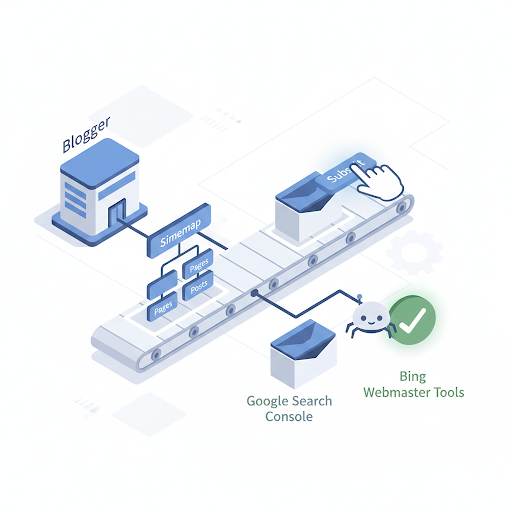
🗺️ Sitemap
This is a list of all your pages. It helps Google know what content you have. You usually find it at: yourblog.com/sitemap.xml
🚫 robots.txt
A small file that tells search engines what not to look at. If it’s not set up right, you could block your whole site by mistake.
⚡ Site Speed
Slow websites annoy people. And guess what? Google notices. A fast site = better rankings + happy visitors.
📱 Mobile‑Friendly
Most people are browsing on phones now. Your site must look and work great on mobile.
🔒 HTTPS (Secure Site)
If your site isn’t secure, people get warnings, and Google won’t like it. Use HTTPS, not HTTP — it’s a must.
For a complete guide to mobile‑friendly design, read How to Customize Blogger Template – it covers safe editing practices and responsive design.
🛠️ Free Tools You Can Use (No Tech Skills Needed)
Here are a few free tools that help you check your site’s health:
- Google Search Console – See if Google can find your site and spot problems
- Google PageSpeed Insights – Test your site’s speed and get tips to improve it
- Mobile‑Friendly Test – Find out if your blog looks good on phones
- SEO Minion (Chrome extension) – Spot broken links and other issues
- Screaming Frog (Free version) – A tool that “crawls” your site like Google does
You don’t need to use them all — just start with Search Console and PageSpeed Insights.
🚀 How to Get Started with Technical SEO (Step‑by‑Step)
Here’s a simple roadmap to get your technical SEO basics in place — no fancy stuff, just what you need:
- Set up Google Search Console for your site
- Submit your sitemap so Google knows where to find your content
- Check your robots.txt file (make sure you’re not blocking pages by mistake)
- Test your site speed and fix anything slowing it down. Use Canva to create optimized graphics that load quickly.
- Make sure your site looks good on mobile
- Switch to HTTPS if you haven’t already (ask your host if you’re not sure)
- Fix any broken links (use a tool like SEO Minion). Use Grammarly to polish your content while you’re at it.
- Avoid repeating content — each page should be unique
- Update your blog often to stay relevant
- Keep learning and improving — take it one step at a time
🙅♂️ Common Beginner Mistakes to Avoid
Let’s save you from headaches later:
- Forgetting to submit a sitemap
- Accidentally blocking your site in the robots.txt file
- Using slow themes or heavy plugins that hurt site speed
- Not testing your site on mobile
- Ignoring broken links or old pages
- Skipping the HTTPS upgrade
These are easy to avoid once you know what to watch for.
💡 The Brutal Truth (Read This Twice)
Most beginners focus all their energy on content creation and keyword research, but ignore the technical foundation. They write amazing posts, but Google never shows them because the site is slow, not mobile‑friendly, or blocked by a misconfigured robots.txt file.
Technical SEO for beginners is not about being a developer. It’s about making sure Google can actually read your site. The good news is that the basics take less than a week to fix. Set up Search Console. Submit your sitemap. Check your speed. Make it mobile‑friendly. Enable HTTPS. That’s it.
Do these things, and your content will finally have a chance to rank. Skip them, and your best posts will stay invisible.
⚠️ Remember: You don’t need to be a tech guru. Just understanding what technical SEO is and fixing the basics can already give you an edge over thousands of bloggers who ignore it completely.
📅 Your 7‑Day Technical SEO Action Plan
- Day 1: Sign up for Google Search Console and add your site.
- Day 2: Submit your sitemap (yourblog.com/sitemap.xml).
- Day 3: Run PageSpeed Insights and fix one speed issue.
- Day 4: Test your site on mobile. Fix any layout issues.
- Day 5: Check your robots.txt file (make sure it’s not blocking Google).
- Day 6: Use SEO Minion to find and fix broken links.
- Day 7: Ensure HTTPS is enabled (look for the padlock in your browser).
In one week, your site will be technically ready for Google — and your content will finally have a chance to rank.
🙋 Frequently Asked Questions
Do I need to know coding for technical SEO?
No. Most technical SEO fixes are simple settings – enabling HTTPS, submitting a sitemap, testing site speed. No coding required.
What’s the most important technical SEO factor for beginners?
Google Search Console setup + mobile‑friendliness. If Google can’t find your site or it looks broken on phones, nothing else matters.
How often should I check technical SEO?
Once a month is enough. Check Search Console for errors, test your speed, and fix any broken links.
Can I do technical SEO on Blogger?
Yes. Blogger supports custom robots.txt, sitemaps, HTTPS, and mobile‑friendly themes. All the steps in this guide work on Blogger.
What if my site is slow?
Use PageSpeed Insights to find the problem. Common fixes: compress images, remove unnecessary widgets, and use a lightweight theme.
🎤 Final Thoughts: Take That First Step
Technical SEO for beginners sounds big, but it’s just the foundation that helps Google trust your site and visitors enjoy being on it. So if you’ve been asking yourself, “What is technical SEO for beginners?” — now you know: it’s how you help your blog get seen.
Now go open up Google Search Console and take that first small step. You’ve got this, brother. 🚀
👉 Ready to make Google love your site? Set up Google Search Console (free). Submit your sitemap. Check your site speed. Fix mobile issues. Start today.