Internal Linking: The Easy Way to Boost Your Blog SEO (2026)
📘 TL;DR – What you’ll learn: Internal linking is when you link from one post on your blog to another. It helps Google understand your site structure, keeps readers on your blog longer, and passes SEO value between your posts. This guide explains what internal linking is, why it matters, common mistakes to avoid, and gives you a 7‑day action plan to start linking smarter today.
🔥 The Secret to Stronger SEO
If you’ve ever wondered why some blog posts rank higher on Google, stay popular for months, and keep readers clicking from page to page, there’s a good chance internal linking had something to do with it.
But what is internal linking exactly? In this guide, I’ll break it down in the simplest way possible. Whether you’re completely new to blogging or just starting to care about SEO, I’ll show you what internal linking is, why it’s super important, and how to do it the right way — even if you’re using Blogger. Let’s make your blog stronger from the inside out, brother.
Before we dive in, understand the foundation of a well‑structured blog. My Categories in Blogger guide shows you how to organize your content – internal linking works hand‑in‑hand with categories. And to track how your internal links improve reader behavior, set up Audience Engagement Metrics – you’ll see time on page and pages per session improve.
📌 The short version:
Internal linking is when you add a link inside one of your blog posts that points to another page or post on your own website. That’s it. Nothing fancy. It’s like saying: “Hey, if you liked this post, check this other one too — it’s related.” These links help both your readers and Google understand how your content connects.
✅ What Is Internal Linking?
Internal linking is when you add a link inside one of your blog posts that points to another page or post on your own website. That’s it. Nothing fancy.
It’s like saying: “Hey, if you liked this post, check this other one too — it’s related.” These links help both your readers and Google understand how your content connects.
📊 Why Internal Linking Matters
Here’s what internal linking does for your blog:
- Boosts SEO: Google follows links to find and understand your content. The more smart internal links you have, the better your chances of ranking.
- Keeps People on Your Site: When readers find useful links to more related info, they stay longer.
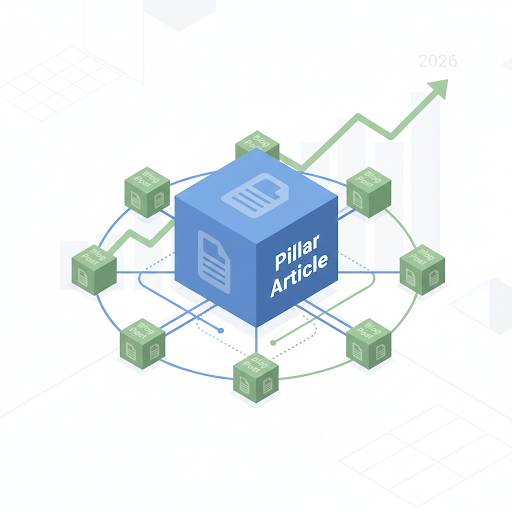
- Organizes Your Blog: Links create structure and show which topics are most important.
- Shares Link Power: If one of your posts is strong in SEO, linking from it to other posts passes on some of that strength.
❌ Common Beginner Mistakes
If you’re just starting, avoid these:
- Adding too many links: Makes your content feel spammy.
- Using the same anchor text every time: It’s better to use natural, different phrases.
- Linking to random stuff: Always ask, “Is this link helpful for the reader right now?”
- Forgetting old posts: Go back and add links to new posts in older articles.
- No linking plan: Random links = weak SEO. Be strategic.
🛠️ How to Do Internal Linking (Step‑by‑Step)
1. Write helpful content first
Internal links only matter if your blog posts are useful.
2. Group related posts
Link between posts that cover similar topics. For example, if you write about SEO, you might also link to a guide on Google Search Console for Blogger – which is exactly what we do below.
3. Use natural anchor text
Anchor text = the words you use for the link. Instead of writing “click here,” use a clear, helpful phrase like: “Learn how to track your traffic with Google Search Console for Blogger.”
4. Update your older posts
Don’t leave your old posts behind. Go back and add new internal links to them. This keeps your content fresh in Google’s eyes.
5. Think like a reader
Ask: “What would I want to read next if I were brand new to this topic?” Then link to that.
👀 What a Good Internal Link Looks Like
If someone is reading a post about growing blog traffic, you might link to:
- A post about SEO basics
- A guide to writing better titles
- A tutorial on creating good content
These are all related and helpful. That’s what internal linking is all about—being helpful and making your site easier to explore.
For a complete guide to structuring your blog for better SEO, read Blogger SEO Checklist – it covers categories, meta tags, and internal linking together.
✅ Final Tips to Do It Right
- Add at least 2–5 links in every blog post (more if the post is long).
- Always ask yourself: Is this link useful for the reader?
- Don’t force it—internal links should feel natural, not robotic.
- Make it a habit every time you publish a new post.
💡 The Brutal Truth (Read This Twice)
Most bloggers ignore internal linking because it seems like a “nice to have” rather than a necessity. But here’s the truth: your blog is a web of connected content. If you don’t link those connections, both readers and Google get lost.
Internal linking is one of the easiest ways to improve your blog’s SEO—without spending money, hiring anyone, or learning complicated stuff. It helps Google, helps your readers, and helps you build a stronger blog overall.
⚠️ Remember: Every post you publish should link to at least 2‑3 other posts on your blog. And every old post should be updated to link to new content. That’s how you build a web that keeps readers on your site.
📅 Your 7‑Day Internal Linking Action Plan
- Day 1: Pick your 5 most popular posts (check Google Search Console).
- Day 2: For each post, identify 2‑3 related posts you’ve written.
- Day 3: Add natural anchor text links from the popular post to the related ones.
- Day 4: Go back to your 5 oldest posts. Add links to newer, relevant content.
- Day 5: Review your “Categories” page – add links to pillar posts.
- Day 6: Write a new post and intentionally add 3‑5 internal links as you write.
- Day 7: Check your internal link structure using a free tool like SEO Minion.
In one week, your blog will have a stronger SEO foundation – and readers will stay longer.
🙋 Frequently Asked Questions
How many internal links should I add per post?
Aim for 2‑5 per post. For longer posts (2,000+ words), 5‑10 is fine. The key is relevance, not quantity.
What’s anchor text and why does it matter?
Anchor text is the clickable text in a link. Use descriptive phrases like “learn more about SEO” instead of “click here.” Google uses anchor text to understand what the linked page is about.
Should I link to my homepage from blog posts?
Occasionally, yes. But focus on linking to other blog posts and pillar pages. Homepage links are less valuable for SEO.
Can I have too many internal links?
Yes. Too many links look spammy and confuse readers. Keep it natural and helpful.
Do internal links affect page speed?
No. Internal links are just HTML text – they don’t affect loading speed. They do affect how Google crawls your site, which matters for indexing.
🎤 Final Thoughts: Link Smart, Grow Faster
Internal linking is one of the easiest ways to improve your blog’s SEO—without spending money, hiring anyone, or learning complicated stuff. It helps Google, helps your readers, and helps you build a stronger blog overall.
So next time you hit publish, don’t stop there. Go back. Link smart. Help your readers take the next step. Because when your blog connects better—everything works better.
You’ve got this, brother. 🚀
👉 Ready to start linking smarter today? Open your Blogger dashboard. Go to an old post. Add 2‑3 internal links to newer content. Takes 10 minutes. Boosts SEO forever.