URL Structure for SEO: Fix These 3 Stupid Link Mistakes
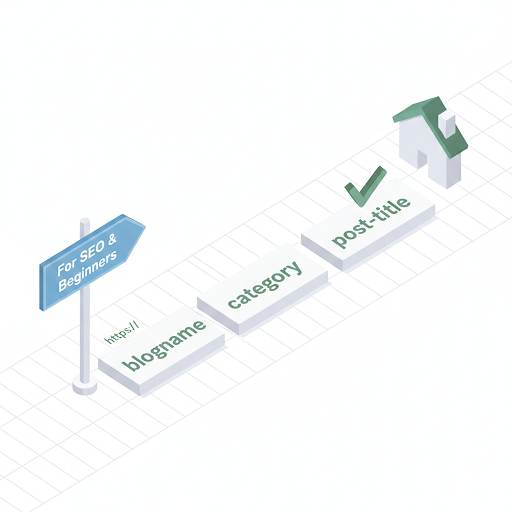
📘 TL;DR – What you’ll learn: Your URL structure can seriously help or hurt your SEO. This guide reveals 3 stupid URL mistakes that kill your rankings – using random characters, stuffing stop words, and changing URLs after publishing – and shows you how to fix them in under 5 minutes per post. Clean URLs = better rankings + more clicks.
🔥 The Hidden Ranking Killer
Let me be direct with you, brother. You spend hours writing great content. You optimize images. You add keywords. But your blog still isn’t ranking. Meanwhile, someone else with weaker content is sitting on page one.
Here’s the truth they don’t tell you: your URL structure for SEO is a mess. And it’s killing your rankings. The good news? Fixing these 3 stupid mistakes takes less than 5 minutes per post. No tech skills needed. Just a few smart clicks.
Before we dive in, understand how URL structure fits into your overall SEO strategy. My Internal Linking guide shows you how clean URLs connect your content. And to find the right keywords for your URLs, check out AI Keyword Research Tools for Beginners – it covers 7 free tools to find low‑competition keywords.
📌 The short version:
A clean URL tells Google exactly what your page is about. A messy URL confuses Google – and Google ranks confusing pages lower. Fix these 3 mistakes today, and watch your click‑through rate climb.
✅ What Is a URL? (And Why You’ve Been Ignoring It)
A URL is basically the link to any page or post on your site. It’s like an address — it tells both people and search engines where to find your content.
Example of a clean URL: yourblog.com/seo-tips
Now compare it with this: yourblog.com/2025/post?id=1234&sort=abc#section
The first one is easy to understand. The second one? Total chaos. And Google notices.
🚫 The 3 Stupid Link Mistakes That Are Killing Your SEO
Mistake #1 – Using Default Random Characters Instead of Words
❌ What you’re doing wrong: Publishing posts with URLs like yourblog.com/2026/02/14/post?id=12345 or yourblog.com/p/abc123. Google has no idea what your page is about. It looks like spam.
✅ The fix (takes 10 seconds): Every time you write a post, manually set the URL. Use your main keyword. Keep it short. Use hyphens between words.
Example: If your post is about “best SEO tools for beginners,” your URL should be yourblog.com/seo-tools-beginners. Not yourblog.com/2025/best-seo-tools-for-beginners-review.
Mistake #2 – Stuffing Your URL with Stop Words and Fluff
❌ What you’re doing wrong: URLs like yourblog.com/the-best-and-most-complete-guide-to-starting-a-blog-for-beginners-in-2026. That’s 12 unnecessary words. Google ignores half of them anyway.
✅ The fix (takes 5 seconds): Cut out stop words like “the,” “and,” “for,” “of,” “to,” “a.” Keep only the essential keywords. Shorter URLs perform better in search results and get more clicks.
Example: Instead of /how-to-start-a-blog-the-easy-way, use /start-blog-easy-way.
Mistake #3 – Changing URLs After Publishing (Without Redirects)
❌ What you’re doing wrong: You published a post, then later decided to “improve” the URL. You changed it. Now the old link is broken. Anyone who shared your post lands on a 404 error page. Google sees broken links and loses trust.
✅ The fix (do this BEFORE publishing): Set your URL correctly before you hit publish. Once a post is live, never change the URL unless you know how to set up a 301 redirect. On Blogger, you can’t easily redirect old URLs – so get it right the first time.
👉 Pro tip: If you absolutely must change a URL, use a redirect plugin or contact your hosting support. But for beginners: set it once, set it right, and never touch it again.
📋 What Does a Good SEO‑Friendly URL Look Like? (Cheat Sheet)
- ✅ Includes your main keyword
- ✅ Short and simple (3‑5 words max)
- ✅ Uses hyphens (-) between words (not underscores)
- ✅ No weird symbols, numbers, or dates
- ✅ All lowercase letters
- ✅ No stop words like “and”, “the”, “of”, “to”, “for”
Example of a perfect URL: yourblog.com/seo-tips-beginners
🛠️ How to Fix Your URLs on Blogger (Step‑by‑Step)
Good news — you can still control your URLs on Blogger. Here’s how:
- Before publishing a new post, look to the right sidebar.
- Click “Permalink”.
- Choose “Custom Permalink”.
- Write a short version of your post title using hyphens.
Example: Post title: “10 Easy SEO Tips for Beginners” → Permalink: /seo-tips-beginners
That’s it. Done. Your URL is now clean, keyword‑rich, and ready to rank.
🛠️ Quick Tools to Audit Your URL Structure (Free)
- Google Search Console – See which pages Google has indexed and check for crawl errors. Set up Google Search Console for Blogger if you haven’t already.
- Screaming Frog (free version) – Scan your whole site for messy URLs and broken links.
- Ubersuggest – Spy on how your competitors structure their URLs.
❌ Common Beginner Mistakes (Avoid These at All Costs)
- ❌ Using random numbers or letters — like
/post1234 - ❌ Stuffing in too many keywords — like
/seo-seo-seo-seo - ❌ Changing URLs without redirection — this breaks links and loses traffic
- ❌ Using capital letters or symbols — can cause link issues (stick to lowercase and hyphens)
- ❌ Including the post date —
/2026/05/seo-tipsmakes your content look old fast
💡 The Brutal Truth (Read This Twice)
Most bloggers ignore URL structure because it seems like a tiny detail. They spend hours on content and SEO, but leave their URLs as default gibberish. Meanwhile, Google sees messy URLs and ranks them lower.
URL structure for SEO is not complicated. It takes 10 seconds per post. Set a clean, keyword‑rich URL before publishing. Never change it after. That’s it. This one habit will improve your click‑through rates and help Google understand your content better.
⚠️ Remember: Your URL is free real estate. Don’t waste it on random characters and stop words. Make it clean, make it short, make it keyword‑rich.
📅 Your 10‑Minute URL Fix Action Plan (Do This Today)
- Step 1: Pick your 5 most visited posts (check Google Search Console).
- Step 2: Look at their URLs. Are they clean? Do they have keywords?
- Step 3: For any post with a bad URL, create a new version with a clean URL (copy content, set new permalink, then delete old one).
- Step 4: For new posts going forward, always set a custom permalink before publishing.
- Step 5: Never change a URL after publishing unless you set up a redirect.
In one hour, your entire blog’s URL structure will be SEO‑ready. No tech skills needed.
🙋 Frequently Asked Questions
Do URLs really affect SEO in 2026?
Yes. Clean, keyword‑rich URLs improve click‑through rates and help Google understand your content. It’s not the strongest ranking factor, but it’s an easy win you should take.
How long should my URL be?
50‑60 characters maximum. Shorter is better. Aim for 3‑5 words.
Should I use underscores or hyphens?
Hyphens (-). Google treats hyphens as word separators. Underscores (_) do not.
What if my blog is already published with bad URLs?
For old posts with no traffic, you can safely delete and republish with a clean URL (but set a redirect if you have backlinks). For high‑traffic posts, keep the URL and focus on new posts going forward.
🎤 Final Thoughts: Your URL Is Free Real Estate – Don’t Waste It
You don’t need to be an SEO expert to get this right. Just avoid these 3 stupid mistakes, and your URLs will instantly become cleaner, more clickable, and more Google‑friendly.
Next time you hit “publish,” pause for a second. Look at your link. Does it clearly show what the page is about? If not, clean it up — future you (and Google) will be glad you did.
Now go check your last 5 posts. Fix their URLs if they’re broken. And never make these mistakes again.
You’ve got this, brother. 🚀
👉 Ready to fix your blog’s URLs in 10 minutes? Open your Blogger dashboard. Go to any draft post. Click “Permalink”. Set a clean, keyword‑rich URL. Publish. Done.